See what actually grows your Substack
Subshack is a privacy-first audit and analytics tool for Substack creators. Score any public profile out of 100, then see which Notes and posts bring subscribers, with nothing posted or messaged for you.
285 public profiles audited so far

Real Subshack workspace · synthetic subscriber data


Works on what Substack already shows you, in the browser you already use
- Notes
- Posts
- Subscribers
- Followers
- Group chats
- Private messages
- Profile audit
- Chrome
- Firefox
- Edge
- Brave
- Arc
Why it matters
Substack shows you attention. Subshack shows you what it earned.
What Substack shows
- 15,692 impressions
- 119 restacks & likes
- — subscribers those Notes brought
- — which format to write again
Likes are not subscribers. The dashboard stops where the question starts.
What Subshack adds
- +4 subscribers from Notes, 0.3 per 1k impressions
- 31.3× more subscribers per impression when a Note closes with an ask to share
- 3 Notes worth writing again, named
- 1 button: write the next one in that format
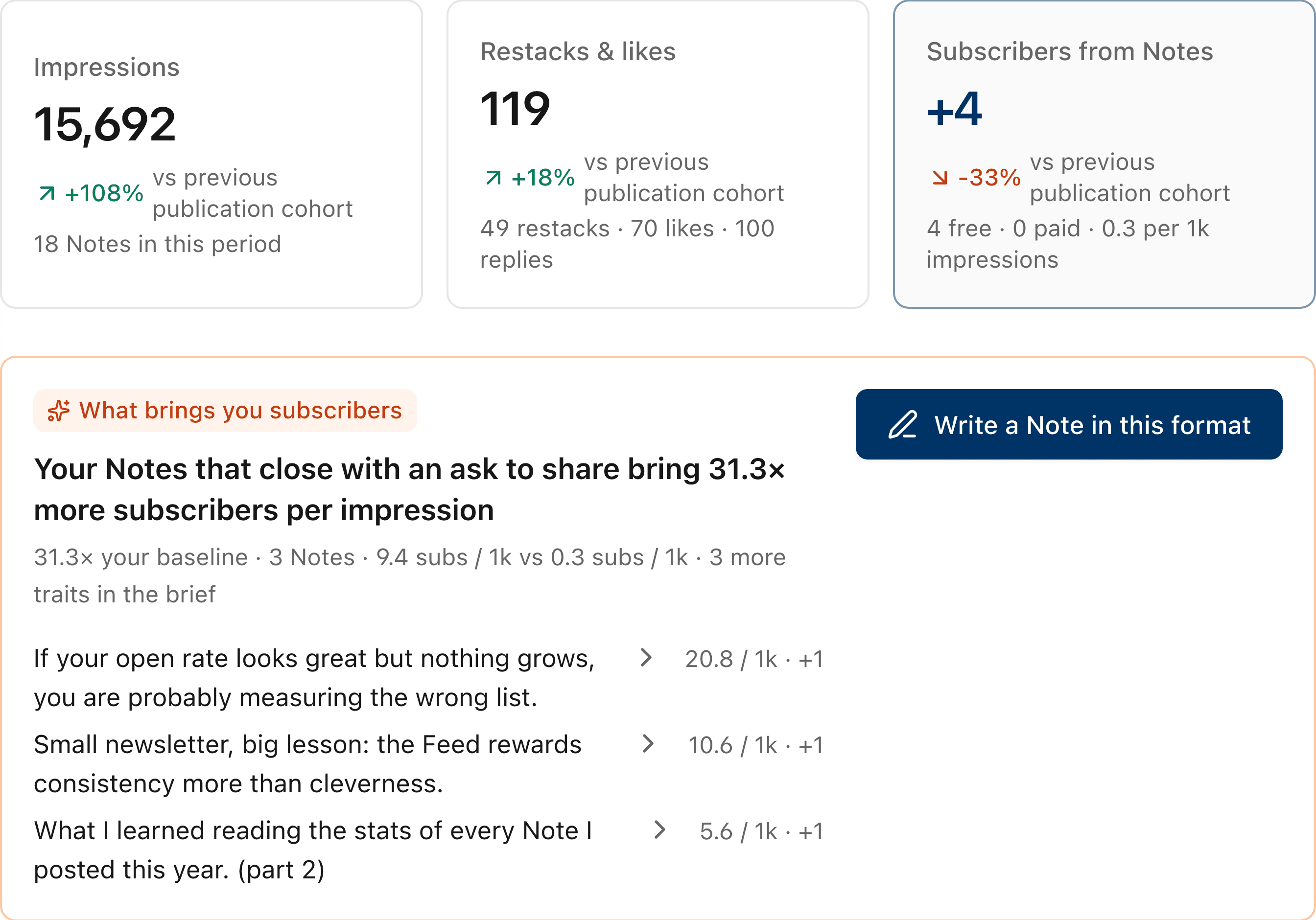
Real Results view · synthetic subscriber data
What you get
From “why did that Note work?” to the next reader worth answering.
Everything is read from your own Substack account, in your browser. You decide what gets sent.
Profile audit
A score out of 100, with the fixes that matter first.
Any public profile, no sign-up. Every check is weighted and the report ranks fixes by impact. No AI decides the score.
Audit a profile →Today
Subscribers gained, and the one action to take next.
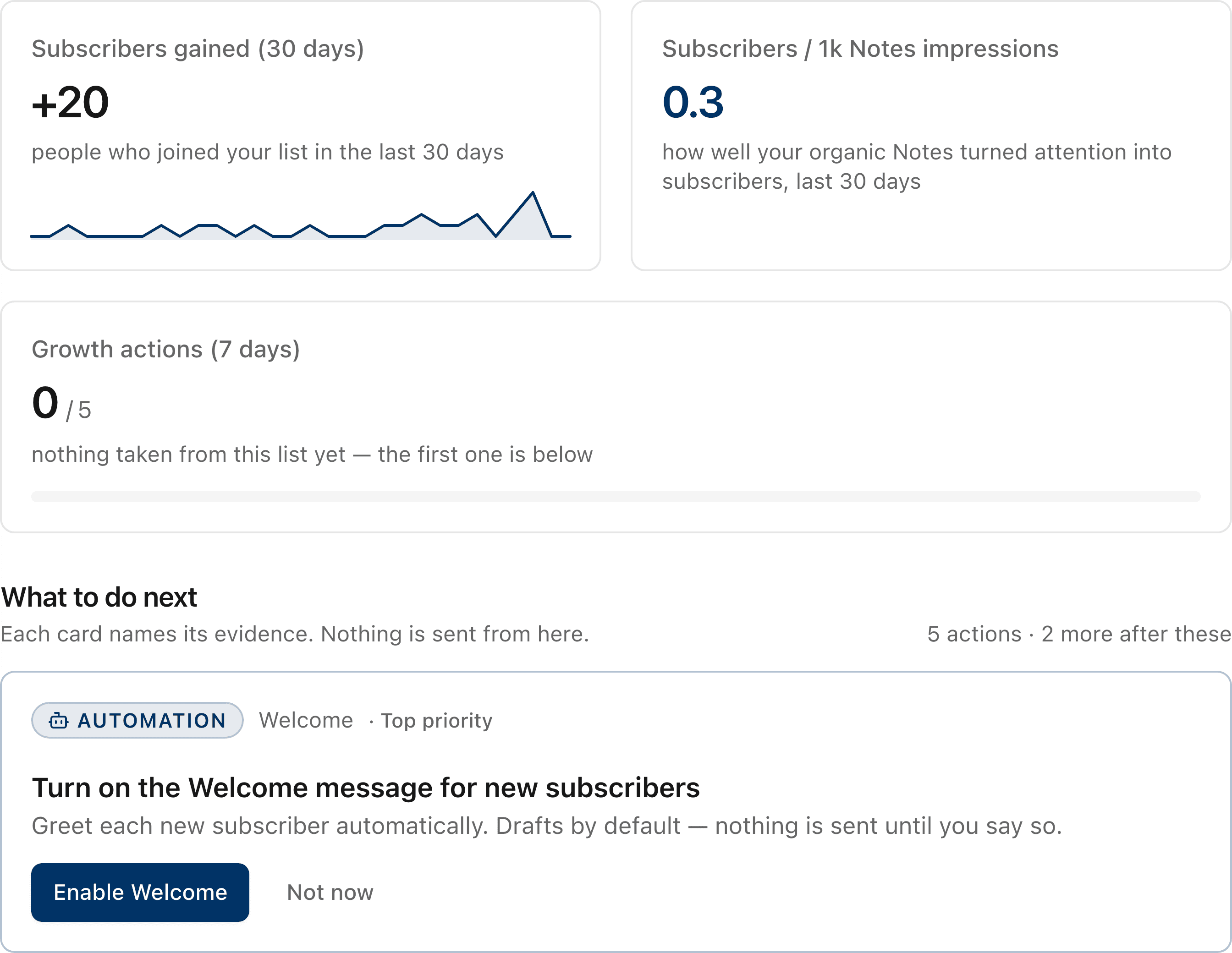
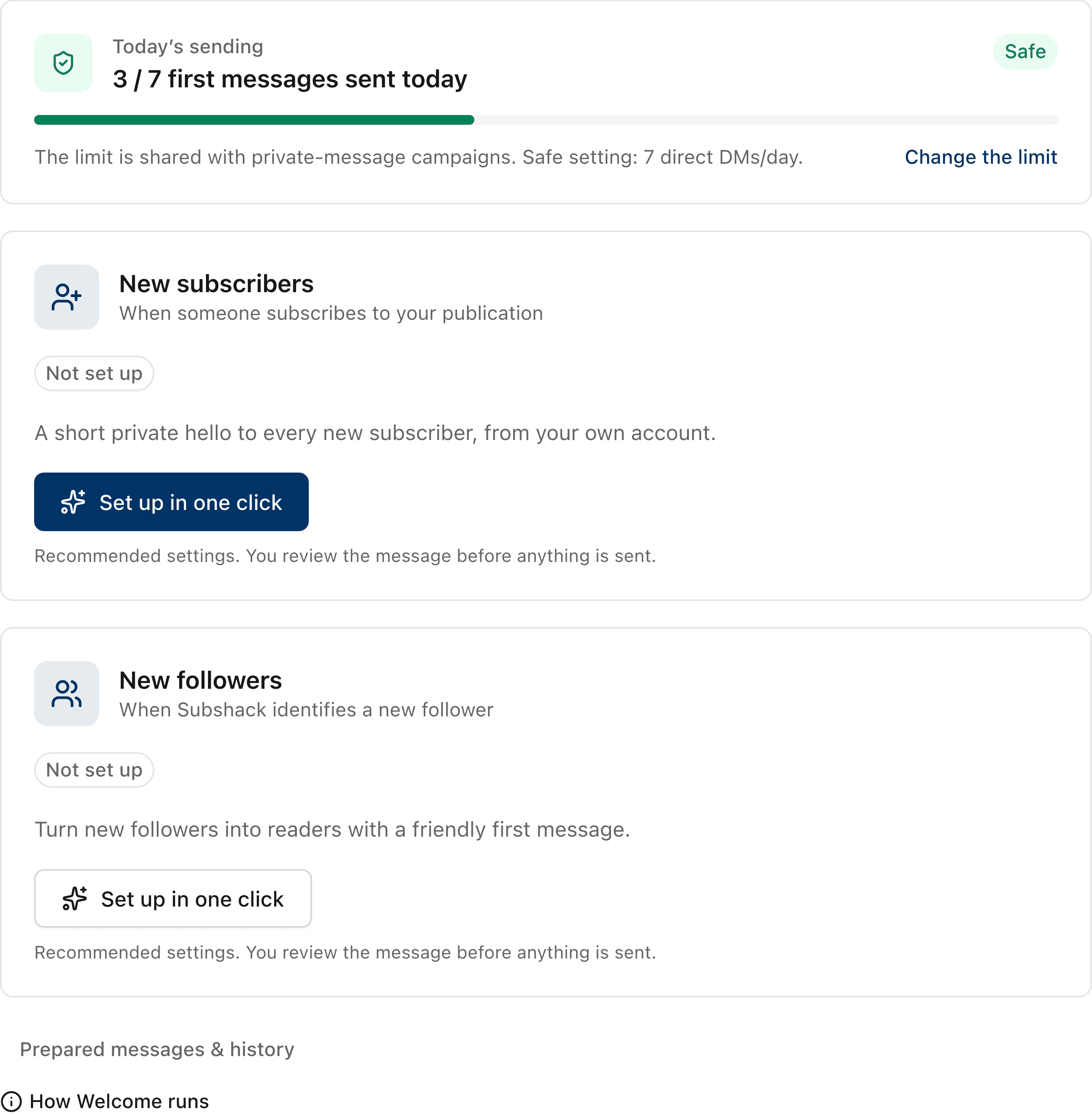
Welcome & campaigns
Greet every new subscriber, within a daily limit.
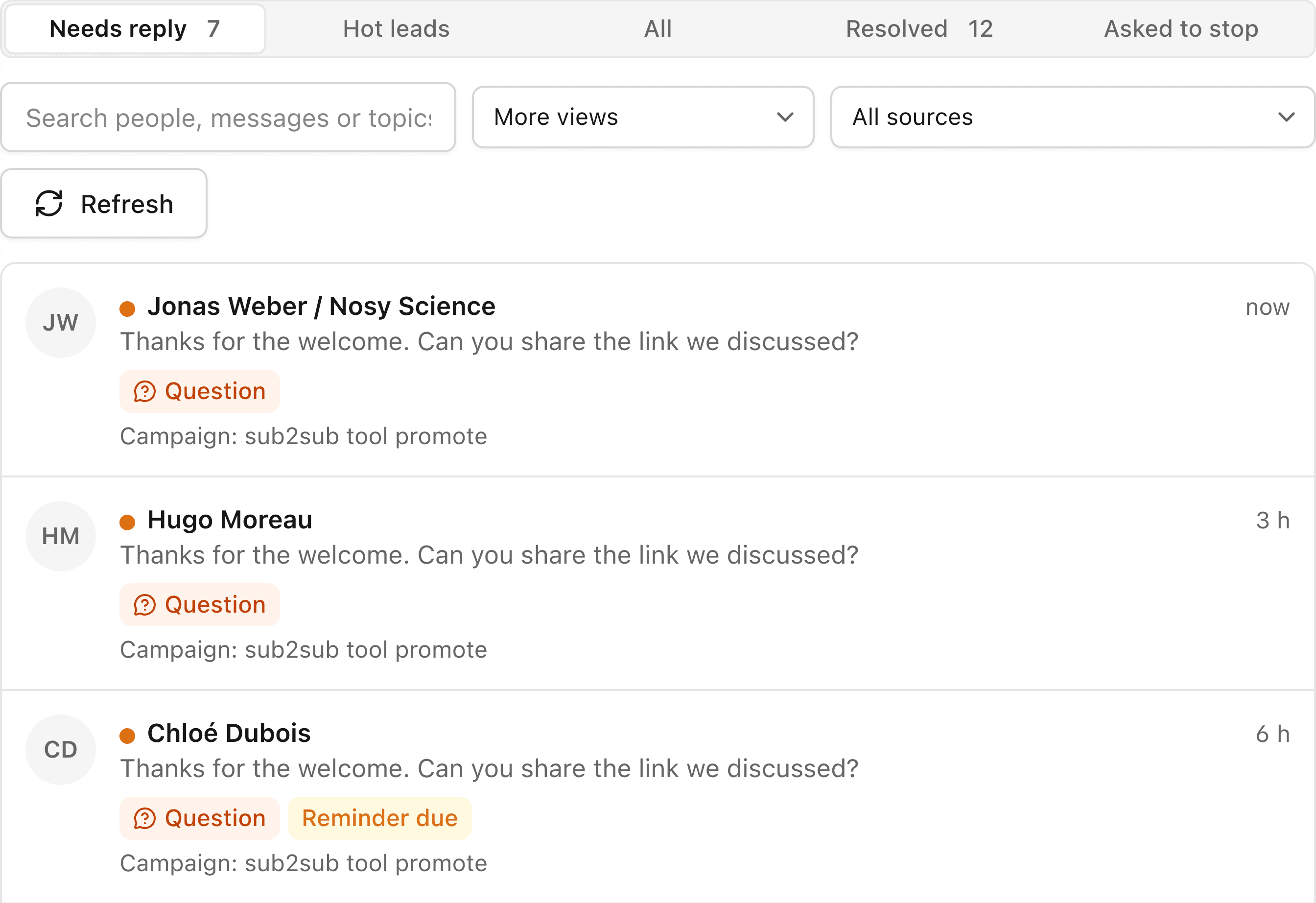
Conversations
Every reply sorted by what it needs.
Private by design
No password. Nothing sent without you.
Stats are computed in your browser from the Substack session you already have.
The workspace
Four views. One question each.
Open subshack.pro/app from the extension: the same screens, on any computer where it is installed.
Subscribers gained, how well your Notes convert attention, and the few actions worth your time today.
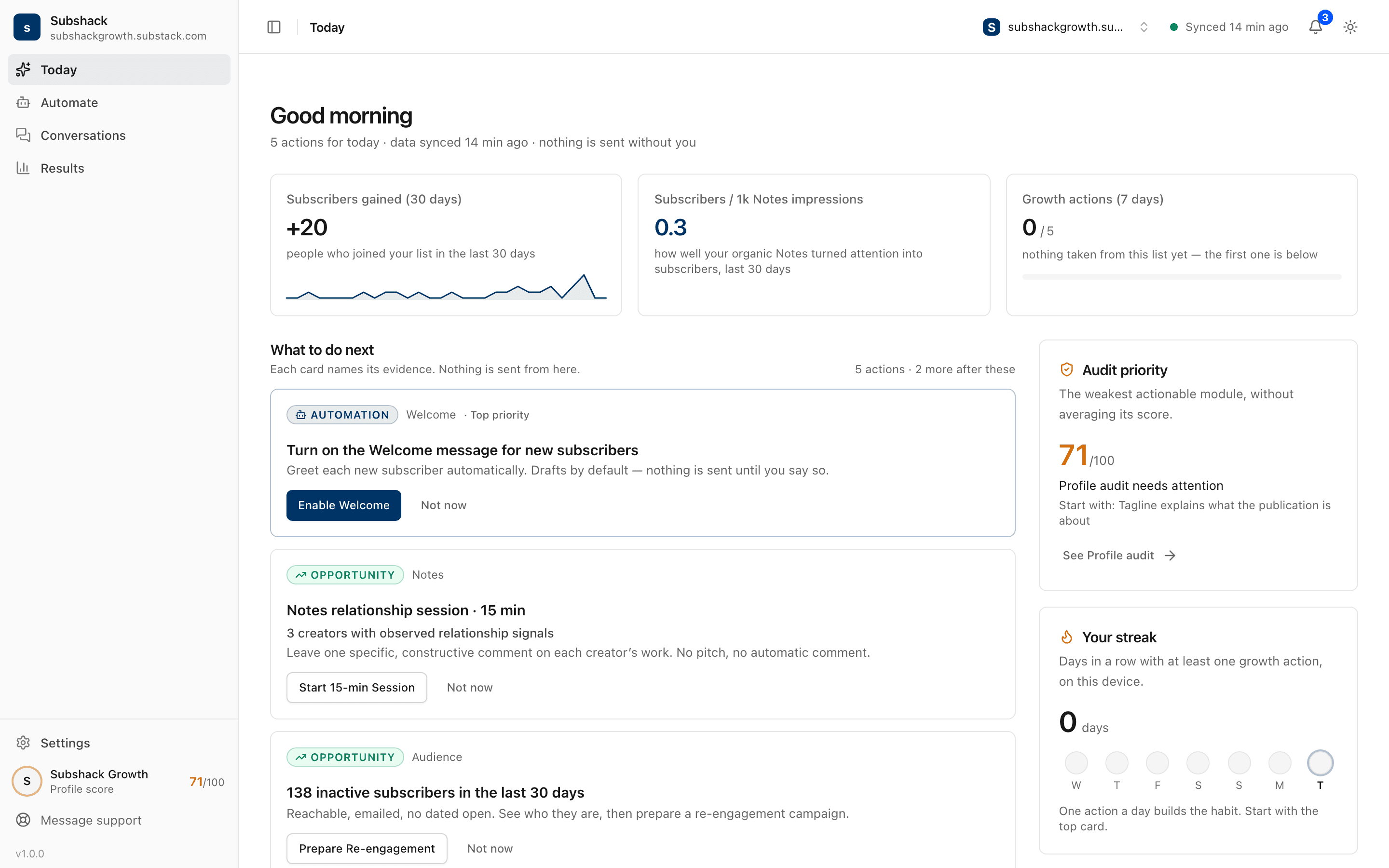
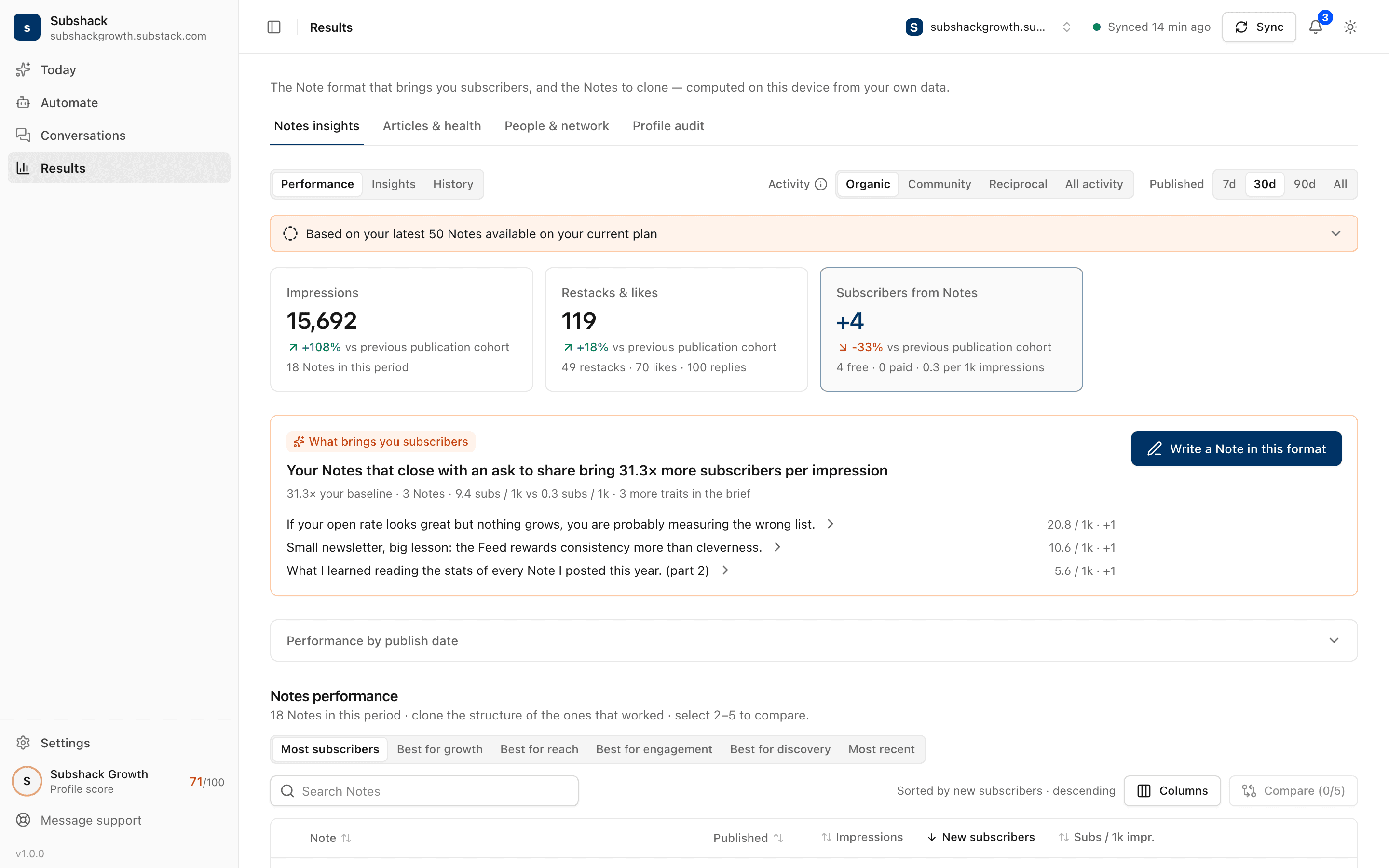
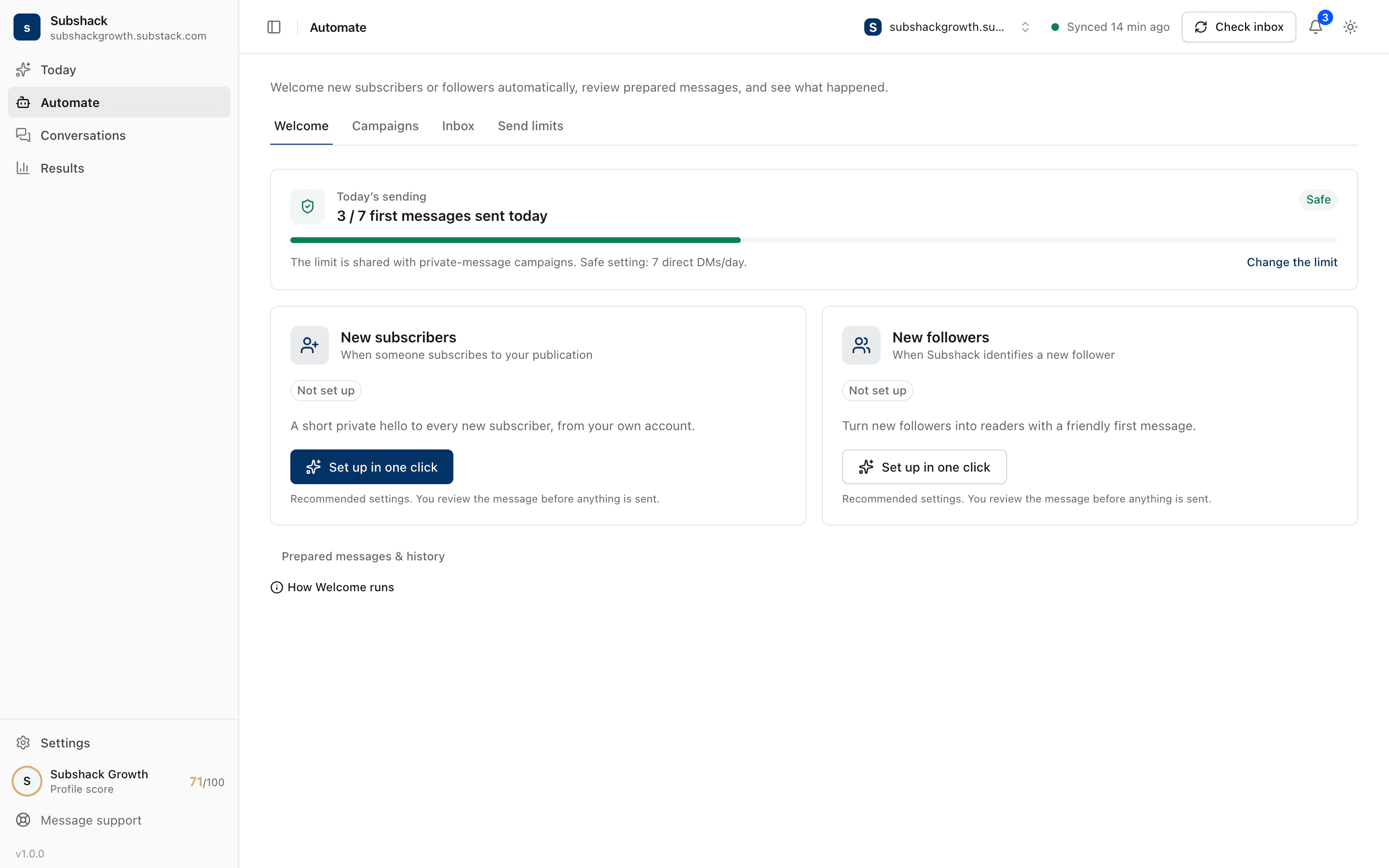
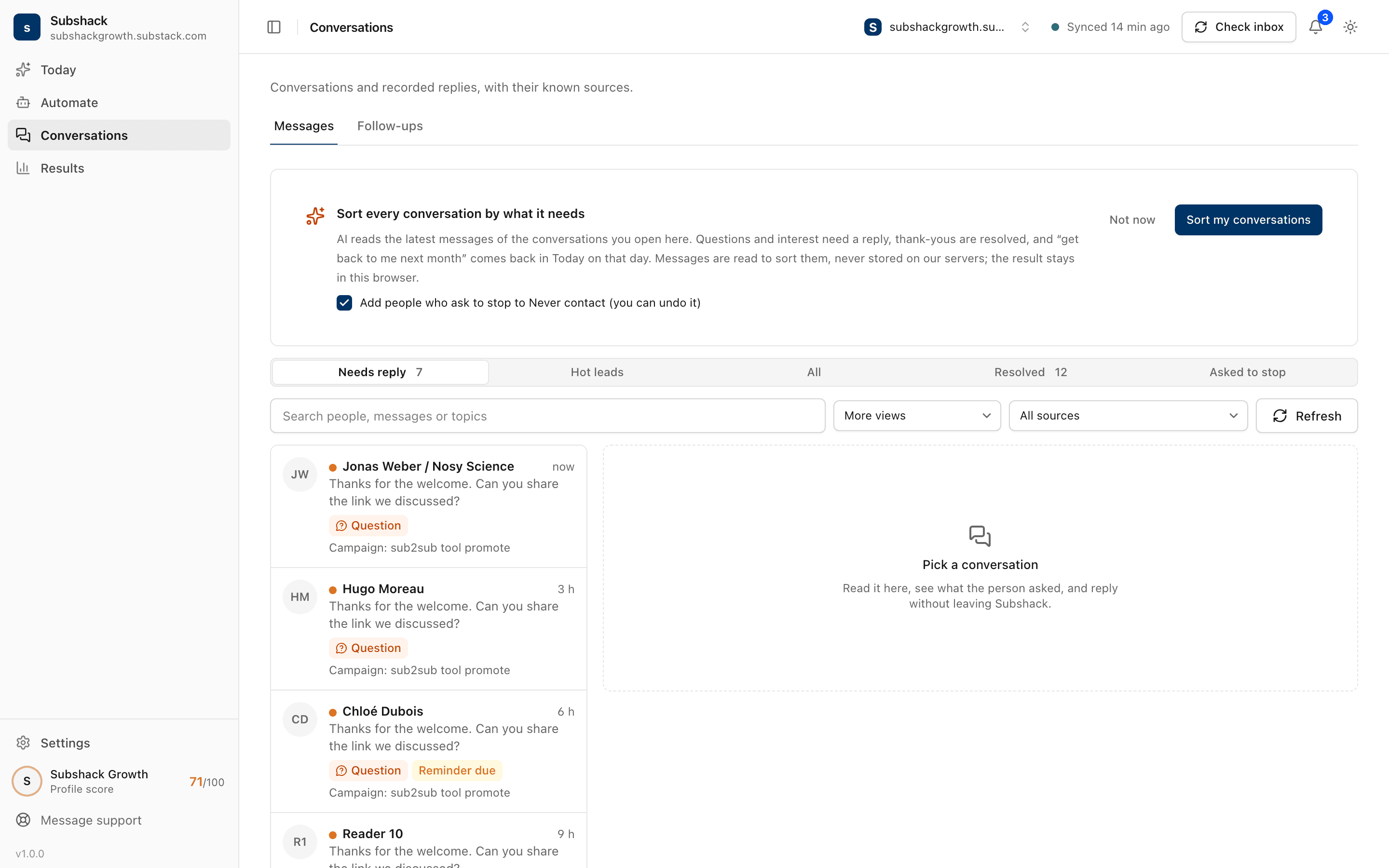
Real Subshack screens · synthetic subscriber data
Free tool
What does a stranger understand from your profile in five seconds?
17 checks across 5 categories, read from the public page. The report explains each result and what to fix first. No account, no install.
46% of Substack profiles fail the five-second test: a stranger cannot tell what you write about, or for whom. Measured by Subshack · 90 profile audits · Aug to Sep 2026
Open the free profile audit- 285
- public profiles audited so far
- 17
- checks per audit
- 100
- points on the scale, no AI decides it
subshack audit substack.com/@yourprofile
Positioning and clarity weight 35
- Publication name
- Profile image
- Tagline / short description
- Five-second clarity
- Editorial coherence
Conversion weight 25
- Subscribe action visible
- Reason to subscribe
- About information
Brand and trust weight 15
- Social preview (Open Graph) image
- External website / social links
Activity and consistency weight 15
- Publishing rhythm (30 days)
- Recent post, episode or Live
- Recent Note
Discovery and SEO weight 10
- Page title
- Meta description
- Open Graph title & description
- Canonical URL
score out of 100 · fixes ranked by impact
How it works
Three steps, then it gets out of the way.
- 01
Install, then open Substack
No sign-up and no password: Subshack reads the Substack session you are already signed in to.
- 02
Sync your own account
Your Notes, posts and subscribers, read in your browser. Nothing leaves without your say.
- 03
See what worked, then act
Which Notes brought subscribers, who is worth replying to, and the welcome each new reader gets.
Grow on Substack,
without the detour.
Original guides from building subshack in public. No subscribe-for-subscribe, no auto-posting.
- How to Get Paid Subscribers on Substack: Build an Offer Readers Will Pay ForBuild a paid Substack offer with six free-vs-paid examples, a practical worksheet, verified setup steps, and a way to measure upgrades without inflated claims.
- Substack Welcome Email Examples for Free and Paid SubscribersCopy 8 Substack welcome email examples for free, paid, founding, and imported subscribers, with setup steps, CTA guidance, and a testing checklist.
- 12 Substack Bio Examples That Give Readers a Reason to SubscribeWrite a clearer Substack bio with 12 original before-and-after examples, profile and publication settings, and a copyable About page template.
- Substack SEO: A Practical Checklist to Get Your Newsletter Found on GoogleImprove your Substack SEO with verified settings, a practical checklist, Search Console checks, and clear advice on custom domains and indexing.
- Substack Followers vs Subscribers: What’s the Difference and How Do You Convert Them?Follow = their Notes in your Substack feed. Subscribe = their new posts in your inbox. A side-by-side table: followers, free and paid subscribers.
- Substack Analytics Explained: What to Track and What Not to TrustMaster Substack analytics: open rates, Notes attribution, subscriber retention, and what each dashboard number can and cannot prove.
- 9 Substack Chrome extensions: which ones post as youNine Substack Chrome extensions, each checked on the Chrome Web Store: what they cost, what they actually do, and which ones publish under your name.
- How to Grow on Substack Without Subscribe-for-SubscribeThe five levers that replaced subscribe-for-subscribe for us: original Notes, replies, cadence, a domain and search, with the numbers from a 7-day test.
- 40 Substack Notes Templates That Get Replies (Copy-Paste)Use 40 fill-in-the-blank Substack Notes templates for opinions, stories, questions, lists and promotion, plus five rules that invite replies.
- How to Write Substack Notes That Get RepliesLearn seven Substack Note structures that invite replies, the four parts of a strong Note, and a practical 20-minute post-publishing workflow.
- Substack Growth Strategy 2026: 4 Channels, Hours and PaybackCompare four realistic Substack growth channels for 2026 by hours required, time to first signal, compounding value and the metric to track.
- Subshack vs Substack Notes schedulers: which do you need?Compare Substack schedulers with Subshack: scheduling fixes when you post; measurement shows what worked. Choose the tool for your real bottleneck.
- Subshack vs WriteStack: Which Substack Extension Do You Need?WriteStack schedules Substack Notes and reports on subscriber conversion, from $23.99/mo. Subshack measures your Notes and audits your profile, free, and never posts.
- The Substack Notes algorithm: what we knowSee what Substack has stated, what is mechanically observable, and which Notes algorithm claims remain unproven, plus a method to test them.
- Substack Notes Scheduling Is Native: What’s LeftSubstack schedules Notes natively now: one at a time, three months out. What that removed from the market, what it did not, and what still needs a tool.
Questions,
answered.
Something else? Read the support page.
Does subshack publish anything for me?
Never a Note, an article or a restack, and it never follows, likes or subscribes for you. It only sends the messages you set up: a campaign starts when you press Start sending, and welcome messages stay drafts unless you choose to send them automatically. Every sending feature has a daily limit and can be paused.
Does it work inside Substack?
Yes. It uses the Substack session you are already signed in with: no sign-up, no password. It adds a small panel on the Substack pages where it helps, and a full workspace at subshack.pro/app: Today, Automate, Conversations and Results.
What does it show that Substack does not?
Which Notes and posts brought new subscribers, not just likes; opens and clicks as counts of people next to the rate; and your best formats and posting hours, measured against your own baseline. Every figure comes from your own account.
Is it free?
Yes. Subshack 1.0 is free to install and use. Every sending feature has a daily limit. If a paid plan arrives later, existing users will be told before anything changes.
Where does my data go?
Your stats are computed in your browser from your own Substack session, and Subshack never asks for your Substack password. A private backup to your Subshack account keeps your workspace available on other devices; it is on by default for new users and can be turned off in Settings › Privacy. It is never shared with other users, sold, or used for advertising.
Is it a Chrome extension?
Yes, and a Firefox add-on. Subshack (sometimes misspelled “subhack”) installs from the Chrome Web Store or Firefox Add-ons, and works in Chromium browsers such as Edge, Brave and Arc.
Get started