Guide · 11 min read · Updated Sep 24, 2026
9 Substack Chrome extensions: which ones post as you
Substack has no plugin system, so the browser is where the tooling lives. Every tool here was checked on its store listing on 25 August 2026, with prices, update dates, and which ones publish as you.
Substack does not have a plugin system. Everything you cannot do in the editor or the Notes composer, you do in the browser — which is why the useful Substack tooling of 2026 is almost entirely Chrome extensions.
That is also why the category is messy. "Substack Chrome extension" covers tools that draft for you, tools that post for you, tools that follow people for you, and tools that count things for you. They are not interchangeable, and a few of them will get your account side-eyed by readers and by Substack.
This guide sorts them by the job they do. Before each one, ask the only question that matters: does this tool do the writing, or does it do the clicking? Tools that help you write and let you publish yourself are safe and compound. Tools that click on your behalf save time until they cost you your reputation.
How we checked this list
Every tool below was opened on its Chrome Web Store listing on 25 August 2026 and cross-checked against the vendor's own site. For each one we recorded the exact listing name, the publisher, the version, the "last updated" date and the user count shown by the store that day, then read the vendor's pricing page.
Three rules decided what made the list:
- It has to be installable from the Chrome Web Store. A ZIP you sideload in Developer Mode is not a Chrome extension for our purposes — it gets no store review and no automatic updates.
- It has to be alive. A listing that no longer resolves to a real store page is out, however good the tool used to be.
- One product, one entry. Extensions get renamed constantly in this category; two names pointing at the same listing count once.
Anything we dropped is listed at the end, with the reason. Numbers move: user counts and versions are a snapshot of 25 August 2026, not a permanent fact. Check the listing before you install.
Disclosure: we build Subshack, one of the tools below, and this guide lives on our own site. We have tried to describe every tool from its public listing and to be as blunt about ours as about the others — including the fact that ours is the smallest by install count. We earn nothing if you install any of the others; there are no affiliate links on this page.
The three categories of Substack Chrome extensions
- Measurement tools read performance and profile signals so you can decide what to repeat. They should not need to publish for you.
- Schedulers and automation tools queue Notes or act from your account. Check whether the browser must stay open, where the session lives, and exactly which actions are automated.
- Writing assistants improve or generate text. Check what leaves the browser, which model receives it, and whether you remain the person who reviews and publishes.
Some products span two categories. Classify the feature you plan to use, not the logo on the store listing.
The comparison table
| Extension | Best for | Key features | Auto-publishes? | Price | Privacy | Updated | Link |
|---|---|---|---|---|---|---|---|
| Subshack | Knowing what your Notes did | Notes & article stats · profile audit /100 · audience | No — never | Free | Nothing posted for you | 24 Aug 2026 · v0.26 | Store |
| WriteStack | The all-rounder, most installed | Scheduling · swipe file · AI drafts · conversion analytics | Yes — via your browser | $23.99–$99.99/mo | Publishes from your own session | 22 Aug 2026 · ~1,000 users | Store |
| SubflowAI | Posting with the laptop closed | Server-side scheduling · analytics · MCP for Claude/ChatGPT | Yes — server-side | $9.97 | Holds a session on its servers | 24 Aug 2026 · ~123 users | Store |
| StackSweller | Researching your niche | Profile & Notes analysis · export · cloud scheduler (separate) | Extension no · cloud app yes | Pro $25/mo | Extension reads profiles | 12 Apr 2026 · ~219 users | Store |
| Substack Note Scheduler | A no-frills queue | Scheduling only | Yes | Not published | Runs in your browser | 8 Jun 2026 · ~436 users | Store |
| NotePilot | Bookmarks + a queue | Scheduling · bookmarks · analytics · AI | Yes | Not published | Runs in your browser | 21 Feb 2026 · ~76 users | Store |
| Substack Autopilot | AI Notes on a queue | AI generation (your OpenAI/Gemini key) · scheduling | Yes | Not published | Your text goes to your model provider | 24 Jun 2026 · v1.0.3 | Store |
| NoteStack | Saving Notes to reuse | Save · draft · schedule | Yes | Not published | Runs in your browser | 31 Mar 2026 · ~13 users | Store |
| Grammarly / LanguageTool | Proofing anywhere | Grammar and tone | No | Free tiers | Your text goes to their servers | Actively maintained | Grammarly · LT |
"Auto-publishes" is the column that matters most. Everything in the "yes" rows is acting as you, under your name, while you are not looking.
1. Subshack — see what your Notes really did
Job: measure, not post.
Subshack is our own extension, and it changed shape in August 2026. It is now a stats and audit tool: it shows how your Notes and articles actually performed, scores any public Substack profile out of 100 across five axes, and gives you an audience view. There is an AI assistant, but it answers questions about your own numbers — "which Note performed best, and why", "who are my most loyal readers" — rather than writing Notes for you. It does not publish: the store listing says "Nothing is posted", and that is the whole design.
Here is a real report, run on our own publication while writing this guide:
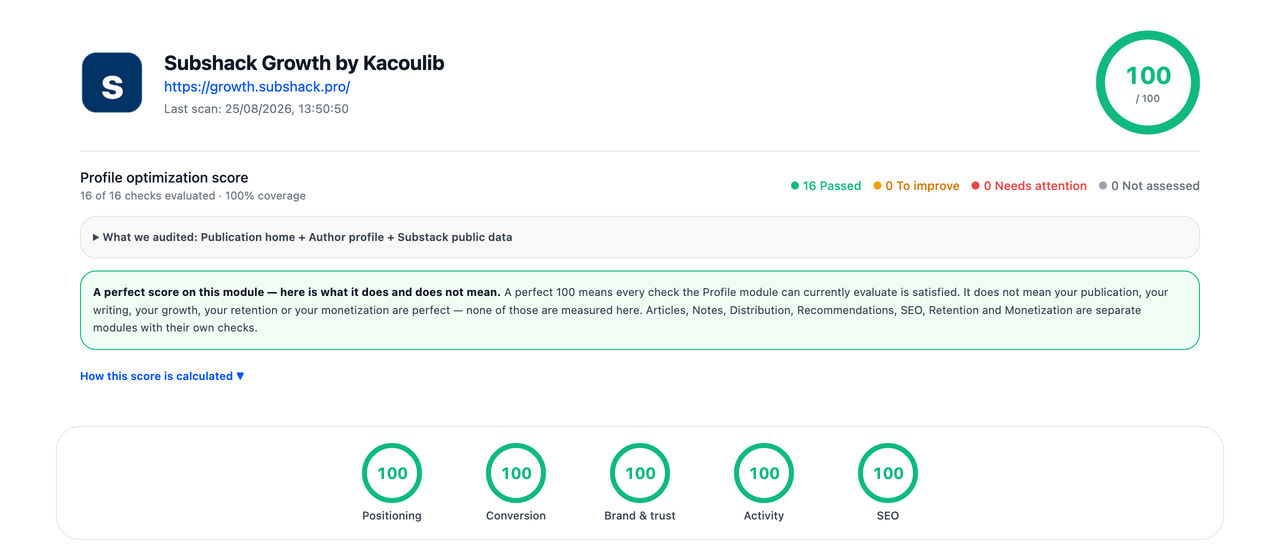
The profile audit on our own publication — tap to run it on yours. Note the caveat the report prints itself: a perfect score on this module does not mean your writing or your growth is perfect — it means the sixteen profile checks pass.
Pros. Free. Never posts, so there is no account risk from automation. The profile audit also runs in the browser without the extension, so you can try the scoring before installing anything.
Limits. It is the smallest tool here by install count — we launched the current listing in August 2026. If your bottleneck is scheduling, it does nothing for you: there is no queue, by design.
Ideal user. A writer who posts regularly and cannot tell which Notes did anything.
Risks. The honest one: it is new, and a young extension has had less time to break in public than a tool with a thousand installs.
Get Subshack — free on the Chrome Web Store · also on Firefox Add-ons
2. WriteStack — the most installed of the bunch
Job: batch, schedule, measure.
WriteStack is the biggest Substack extension we found, at roughly a thousand users, and the most actively maintained (updated three days before we published this). It schedules Notes, batches drafts, generates with AI, and reports on which Notes converted subscribers. It also keeps a "swipe file": a light-bulb icon next to the share button saves any Note straight into your drafts while you scroll.
Pros. The broadest feature set here, and the one most likely to still exist next year. Genuine analytics rather than a counter.
Limits. It is the most expensive on the list — $23.99/month at the entry tier, up to $99.99 — with a 7-day trial. Publishing happens through your browser, so Chrome has to be running when a Note is due.
Ideal user. Someone already earning from Substack who wants one tool instead of four.
Risks. Price, mostly. And a browser-based queue silently misses its slot if your laptop is asleep — check what actually went out.
3. SubflowAI — scheduling that does not need your laptop awake
Job: publish on time without babysitting the browser.
SubflowAI moved its scheduling server-side, which removes the failure mode above: your Notes go out whether or not Chrome is open. It also turns a long post into a batch of Note variations, and ships an MCP server that lets Claude or ChatGPT read your stats and queue Notes.
Pros. $9.97 is the cheapest credible scheduler here with a published price. Server-side posting is genuinely more reliable. The MCP angle is unusual and useful if you already work in an AI assistant.
Limits. Server-side posting means the service holds a way to act as you on Substack. That is the trade you are making for reliability — it is not a flaw, but it is not nothing.
Ideal user. A writer who schedules a week ahead and travels, or closes the laptop.
Risks. Anything that posts from a server posts even when you have changed your mind. Keep the queue short enough to remember what is in it.
4. StackSweller — the research tool, and a scheduler behind it
Job: find the shapes that work before you write.
This one needs untangling, because the extension and the product are not the same thing. The extension analyses any Substack profile: top Notes, post analytics, bookmarks, data export. The cloud app at stacksweller.com is a scheduler that runs without a browser extension at all — their own FAQ says you can close your laptop.
Pros. As a research tool it is the best value here, and the extension side does not post anything. Studying fifty Notes that worked in your niche teaches you more than any template list.
Limits. The extension has not been updated since April 2026 — the longest gap on this list. Scheduling costs $25/month on the Pro plan and lives in the web app, not the extension.
Ideal user. The "I post but nothing happens" phase, where you need to see what good looks like.
Risks. Read their own security note before connecting the scheduler: linking your Substack account to a cloud service is a bigger step than installing a read-only extension.
5. Substack Note Scheduler — the plain queue
Job: schedule Notes, full stop.
Around 436 users and no ambition beyond the one job. If every tool above feels like a suite you will not use, this is the one that just posts what you told it to post.
Pros. Simple, reasonably popular, actively maintained as of June 2026.
Limits. No analytics, no AI, no published price — you find out the commercial terms after installing, which we dislike.
Ideal user. Someone who already knows what to write and only needs the timing.
Risks. Note the name collision: there is a second, unrelated extension also called "Substack Note Scheduler" (published by QuickViralNotes, ~21 users). Check the publisher, not the name, before installing.
6. NotePilot — scheduler, bookmarks, analytics
Job: the three-in-one, on a small budget.
Scheduling, a bookmark library and a basic analytics panel, with AI note generation on top.
Pros. The bookmark habit is underrated: capturing Notes you admire is how you build a personal swipe file.
Limits. Last updated 21 February 2026 — six months before we checked. By this guide's own rule of thumb, that is the line past which a Substack extension is probably fighting markup changes. Test it on one Note before you trust a week's queue to it.
Ideal user. A writer who wants bookmarks more than scheduling.
Risks. Staleness. See above.
7. Substack Autopilot — AI Notes on a queue
Job: generate and post.
Formerly listed under other names, this one now sells itself as "Substack Autopilot — Designed for Writers": AI note generation wired to your own OpenAI or Gemini key, plus scheduling.
Pros. Bring-your-own-key means you pay the model provider directly instead of a markup.
Limits. Small install base and a solo publisher with a personal contact address. Generated Notes read like generated Notes; edit before you queue.
Ideal user. Someone comfortable managing an API key who wants cheap AI drafting.
Risks. The name has changed at least once. If you install it, re-check the listing occasionally to confirm it is still the product you chose.
8. NoteStack — the smallest one here
Job: save Notes, draft, schedule.
We include it for completeness: it is live and it works, but at roughly 13 users and last updated in March 2026, it is a young project rather than an established tool.
Pros. Straightforward save-and-schedule flow.
Limits. Tiny user base, no published price, no analytics.
Ideal user. Early adopters who like backing small tools.
Risks. Highest abandonment risk on this list. Do not put a month of content in it.
9. Grammarly / LanguageTool — the boring one
Job: catch what your eyes skip.
Not Substack-specific, but the Substack editor has no proofing beyond spellcheck. LanguageTool is open-source-friendly and multilingual; Grammarly is more opinionated about tone. Either one, on. Turn off "rewrite" suggestions if you want to keep your voice.
Risks. Both send what you type to their servers. That is fine for a public Note and worth a thought for a paid post under embargo.
The automation extensions we deliberately do not recommend
These are real, live and easy to find, so pretending they do not exist helps nobody:
- Substack Messaging Extension (marketed as Auto Messenger Pro, ~121 users) — bulk DMs your subscribers.
- Auto Clicker for Follow Buttons (marketed as FollowFlow, ~110 users) — mass-follows and unfollows Substack creators.
Both act as you, at scale, in the two places where being a person matters most. Bulk DMs and mass follows are the fastest way to become the writer everyone mutes. We have written up what we did instead.
What we removed from this guide, and why
An earlier version of this page listed four tools that no longer survive the checks above. Removing them is the point of dating a list:
| Removed | Why |
|---|---|
| Kalemly | No longer a Substack tool. kalemly.com now redirects to a privacy policy describing "messaging automation and customer support services", with no Substack product page and no live Substack extension we could find. |
| Substack Notes Automator | Not a separate product. The listing we linked is the same one now called Substack Autopilot — we were listing one extension twice, under two names it used to have. |
| Notes Scheduler Pro (Write with Tools) | Its Chrome Web Store listing no longer resolves to a real page. The vendor's site still links to it; the link is dead. |
| NoteScout Pro | Not a Chrome Web Store extension. It is a $10 ZIP sold on Gumroad that you load through Developer Mode — no store review, no automatic updates. It may work fine; it does not belong in a list of store-installable extensions. |
How to choose (in one minute)
Answer these in order:
- Do I know what my Notes actually did? If no → a stats and audit tool (Subshack, StackSweller) before you buy a scheduler. Most people optimise a queue they cannot measure.
- Do I write plenty but post at bad hours or forget? → a scheduler. Laptop always on: WriteStack. Laptop closed: SubflowAI or the StackSweller cloud app.
- Do I post but nothing lands? → research what works in your niche (StackSweller) for two weeks, then fix the shape with our 40 Notes templates.
- Am I tempted by follow/DM automation? → don't. It works for a week and costs you for a year.
You can combine: measure with Subshack, queue with a scheduler, research with StackSweller. They touch different steps and do not conflict — we wrote a side-by-side of Subshack and the schedulers if you want the long version.
What to check before installing any of them
- Permissions. A Substack tool needs access to
substack.comand, if you use a custom domain, your publication's domain. It does not need "read and change all your data on all websites". - What leaves your browser. Anything with AI sends text to a model provider. Read the privacy policy; a serious tool will say exactly what is sent and what stays local (ours).
- Who publishes. Extensions that post, follow or message on your behalf act as you. If it goes wrong, it went wrong under your name.
- Whether it still works. Substack changes its markup regularly. An extension not updated in six months is probably broken — two tools on this page are close to that line, and we said which.
- The publisher, not the name. Names in this category change often, and at least two pairs of extensions here share a name. Check who publishes it.
The one rule
Substack rewards writers who show up with something to say and reply like a person. Every tool above is worth having exactly to the extent that it gets you back to that faster — and worth deleting the moment it starts doing the talking for you.
For the craft side of that: how to write Notes that get replies. For where the tooling fits in a whole strategy — hours per channel, what to measure, a 90-day plan — Substack growth strategy 2026. Use the Substack analytics guide to keep views, recipients, opens and attributed subscriptions separate. For how the Notes feed decides what to show, read the Substack Notes algorithm.
Before you install any of them, it is worth knowing which problem you actually have. The free Substack profile audit scores your public profile out of 100 across five axes and names the weakest one — no signup, no extension required. No tool on this page fixes a positioning problem.
Frequently asked
- Are Chrome extensions allowed on Substack?
- Extensions run in your browser, on pages you already have access to. Substack does not ban them, but anything that posts, follows or messages automatically on your behalf can look like spam to Substack and to readers. Prefer tools that draft and let you publish yourself.
- Do these extensions work on Firefox, Safari or Arc?
- Arc, Brave and Edge run Chrome extensions as-is. Firefox needs a dedicated build that most Substack tools do not ship yet, and Safari extensions are a separate ecosystem: very few Substack tools exist there.
- Which Substack Notes extension helps most?
- It depends on your bottleneck. If you cannot tell which Notes worked, start with a stats and audit tool (Subshack is free, StackSweller researches other profiles). If you write plenty but post at bad hours, a scheduler helps: WriteStack if your laptop is always on, SubflowAI if it is not. Buying a scheduler before you can measure means optimising a queue you cannot read.
- Are there free Chrome extensions for Substack?
- Yes. Subshack is free, and Grammarly and LanguageTool both have free tiers. Most Substack Notes schedulers are paid: published prices in August 2026 ranged from $9.97 for SubflowAI to $23.99 to $99.99 a month for WriteStack, and several vendors do not publish a price at all until after you install.
- Which Substack extensions post on your behalf?
- Every scheduler does. That is what scheduling is. WriteStack, NotePilot, NoteStack, Substack Autopilot and Substack Note Scheduler publish from your own browser, so Chrome has to be running when a Note is due. SubflowAI and the StackSweller cloud app publish server-side, which is more reliable but means the service holds a way to act as you. Subshack never posts.
Subshack shows how your Substack Notes and articles actually performed, and scores any profile out of 100. Free, and it never posts for you.
Get subshack on the Chrome Web Store